
Our Town Hall printers and copiers are supported under the Commonwealth of Massachusetts ITE001 contract with Ricoh (Contract #5587025).
If you need toner or service on a Ricoh multi-function device (MFD), please use one of the methods below
How to order Toner/Staples and Log a Support Call
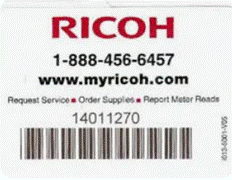
Locate the Equipment ID:
Find the metallic sticker on the front of the device, which includes an 8-digit Equipment ID and a QR code.
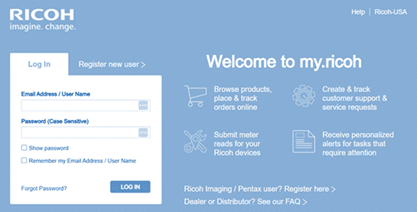
Go to the MyRicoh portal:
Log in to https://my.ricoh-usa.com/ to order supplies online.
If you are a new user, you will need to register.
Use the online portal:
The portal allows you to submit service and supply requests online and sometimes includes an option to chat with an agent.
Call the number on the sticker:
Alternatively, call the phone number listed on the sticker on the front of the copier.
Provide the Equipment ID:
When ordering supplies, you will need to provide the 8-digit Equipment ID from the sticker.
Important Notes
- Please do not purchase toner on a department credit card.
- Toner and service for Ricoh devices are covered under the contract when ordered correctly.
- If you are unsure which printer you are using, check the label on the front of the machine
OPTION 1: MyRicoh Online Portal (Preferred Method)
This is the fastest and easiest option.
- Go to www.myricoh.com
- Click Register and create an account using your town email address
- You will be asked for a machine serial number or equipment ID
- This is located on a label on the front or side of the machine
- Once logged in, you can:
- Order toner and supplies
- Submit a service request
- Check the status of existing requests
The portal is available 24/7.
OPTION 2: Call Ricoh Support
If you cannot access the portal or the machine screen:
Ricoh Customer Support: 1-800-843-7058
Tell them you are calling under the Commonwealth of MA ITE001 contract
and provide the machine serial number.
Quick Summary (Employee Steps)
Task | Best Method |
Order toner/supplies | Log in to MyRicoh.com or call Ricoh support |
Report broken machine /request service | Submit ticket on MyRicoh / call support |
Check order or ticket status | MyRicoh portal online |