
When connecting to MMS or other Town of Falmouth remote applications, you may see a RemoteApp security warning. This prompt appears when Windows needs permission to allow certain local resources to be used by the remote application.
Follow the steps below to continue safely.
What You Will See
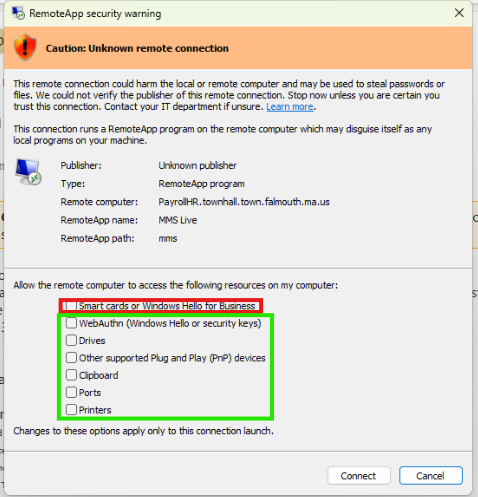
The security warning includes a list of checkboxes labeled “Allow the remote computer to access the following resources on my computer.” The first option relates to smart cards and Windows Hello features that are not used in our environment.
The remaining options control access to common resources such as drives, printers, the clipboard, and plug‑and‑play devices.
What To Do
Leave the first option unchecked:
Smart cards or Windows Hello for BusinessSelect all the other options in the list:
- WebAuthn (Windows Hello or security keys)
- Drives
- Other supported Plug and Play (PnP) devices
- Clipboard
- Ports
- Printers
Click Connect to continue into MMS.
Why This Is Required
Selecting these options ensures that MMS can communicate with your local system where needed (for example: printing, copying/pasting, and accessing files).
Leaving the first option unchecked prevents Windows from attempting authentication methods that are not supported in our remote environment.
Still Need Help?
If you are unsure about the prompt or if something does not look like the screenshot shown above, please contact the IT Help Desk for assistance. We’re happy to walk you through the process.